


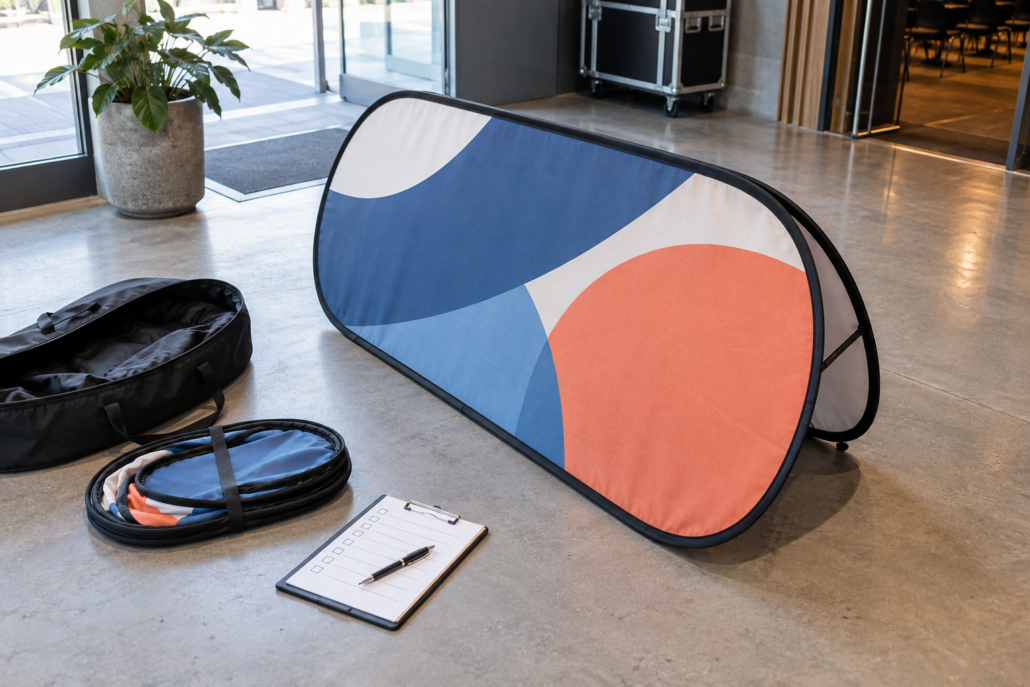
A custom pop-up A-frame banner is easy to notice in a product catalog. The harder part is specifying the order so the finished display fits the event, the artwork is usable, and the delivery plan is realistic.
That is why a short procurement brief is more useful than a vague request for “a banner like this.” A supplier can quote more accurately when the request explains where the display will be used, what the audience should see, how the team will transport it, and when it must arrive. This guide gives you a nine-point brief you can complete before requesting a quote for a custom pop-up A-frame banner.
1. Start with the decision the banner must support
Do not begin with color, shape, or a competitor’s photo. Begin with the decision your audience should make after seeing the display. Is it supposed to identify a registration point, make a sponsor visible, direct visitors toward an entrance, support a retail promotion, or reinforce a trade-show message?
Write the intended action in one sentence. For example: “Visitors should recognize the registration area before they reach the venue doors.” That sentence gives the artwork a job. It also helps the supplier understand why the display is being purchased instead of treating the request as a generic print order.
Vancke lists pop-up A-frame banners for events, sports, retail, promotions, and trade shows. Those settings do not automatically require the same message. A sports sponsor may need a brand name that can be understood while people move past. A registration display may need a short location cue. The product can stay portable and custom printed while the communication task changes.
2. Describe the real installation environment
Give the supplier the setting, not only the event name. Include whether the banner will be indoors or outdoors, whether visitors approach from one main direction or several, and whether the display will sit beside a doorway, along a route, near a field, or inside a booth.
Also state what the team knows about the surface and the available footprint. A display placed at an entrance has different practical constraints from one placed on an open event field. If the venue has a placement rule, send it with the brief. If the site is not confirmed, say so instead of letting the supplier guess.
For public locations, add a “venue requirements to confirm” line to the brief. This is where you verify local rules about circulation, sightlines, and accessible routes. The official ADA accessibility standards are a useful U.S. reference, but they do not replace the venue’s own instructions or the requirements in another country.
3. Choose the viewing logic before choosing the artwork
Explain how people will see the banner: approaching from one direction, passing on both sides, stopping in front of it, or viewing it from a distance. Then identify the information that must remain legible first.
Keep that priority short. A practical order is:
- primary brand or event identifier;
- one message or offer;
- one directional cue or next action.
Everything else is optional until the first three items work. A procurement brief that says “include the logo, website, phone number, sponsor list, product range, and full event schedule” is not a design brief. It is a list of competing demands. Ask the supplier to propose a layout after you state the viewing condition and the one action that matters most.
4. Send artwork inputs in a form a designer can use
List the files you can provide: logo, brand colors, approved photos, sponsor marks, existing campaign artwork, and any required wording. Name the file owner and the person who can approve changes. This prevents the common delay where a design is nearly ready but no one knows which logo or message is final.
If the artwork is incomplete, say what is missing. Vancke offers design support, and its free design request page asks for the product, design idea, preferred style, colors, reference images, and email. Treat those fields as a useful minimum for your own brief.
Do not ask a supplier to “make it pop” without explaining the brand boundaries. Provide the words that cannot change, the logos that must remain intact, and any legal or sponsor wording that requires written approval. Creative freedom is useful only after the non-negotiable information is clear.
5. Confirm the product format and quantity
State how many displays you need now, whether each unit uses the same artwork, and whether different locations require different messages. If you are ordering for a series of events, separate reusable master artwork from event-specific text.
Vancke describes the pop-up A-frame as a portable display that folds for transport and can carry custom printed graphics. That makes the transport plan part of the buying decision. Tell the supplier whether the team will move the display between venues, store it between events, or send units to different locations.
For multiple units, add a simple table to the inquiry: unit name, quantity, artwork version, delivery destination, and must-arrive-by date. This is more actionable than writing “please quote a bulk order” and hoping every variation is understood.
6. Turn the event date into a delivery brief
Separate three dates: the event date, the date the goods must be in hand, and the latest date the artwork can be approved. The last date is often the one procurement teams forget. Production cannot start from an unfinished or unapproved file.
Include the destination country and city, receiving hours, contact person, and any venue delivery restrictions. Ask the supplier to confirm the production and delivery plan in writing. Vancke states that worldwide delivery options are available; your quote request should still identify the actual destination and deadline rather than assuming that every route has the same timing.
If the deadline is tight, ask for the earliest safe approval date and the consequence of a late proof approval. A realistic plan is more valuable than a confident promise that omits the decision points.
7. Define what “proof approved” means
Request a digital proof before production and decide who has final approval. Check the logo, wording, colors, image crop, safe margins, orientation, and any sponsor hierarchy. If the banner will be viewed outdoors, also review the design at the distance where people will actually encounter it.
Put the approval rule in the brief: “Production may begin only after the named approver confirms the proof in writing.” Vancke’s artwork-template guidance describes sending mockups for approval before an order enters production. That step is not administrative decoration; it is where the buyer catches the wrong file, wrong message, or wrong version before those errors become a delivery problem.
Keep one approved proof with the quote and order record. If several people comment, nominate one person to consolidate the feedback. Multiple uncoordinated approvals create avoidable contradictions.
8. Ask for a quote that can be compared
Your quote request should ask for the same information from every supplier:
- product format and quantity;
- included components and carry or transport method;
- artwork or design-support scope;
- proofing process and approval point;
- production timing and delivery option;
- shipping destination and any charges that are not included;
- the contact responsible for order questions.
Do not compare only the headline unit price. Compare whether the quote answers the operational questions that could delay the event. A lower number with an unclear proof process, incomplete delivery terms, or no named assumption is not automatically the lower-risk choice.
9. Make the inquiry easy to answer
Finish the brief with one clear request: “Please confirm the recommended format, the artwork information still needed, the proof timeline, the earliest achievable delivery date, and the total quote for the attached quantities.” That sentence tells the supplier what a useful reply looks like.
Attach the artwork, the venue notes, and the unit table. Use a file name that includes the project and version. If you need design help, say whether you want a concept created from a rough idea or a production-ready file adjusted to the display.
For web-published images, keep the image description concise and purposeful. The W3C WAI image guidance is a noncommercial reference for writing useful alternative text; it is separate from the physical banner specification but useful when your product page or case study includes the display.
A copy-and-paste pop-up A-frame banner brief
Project: [event or campaign name]
Audience action: [what should people do or understand]
Environment: [indoor/outdoor, surface, approach direction, footprint, venue rules]
Format and quantity: [product format, number of units, artwork versions]
Artwork supplied: [logos, colors, images, wording, reference files]
Design support needed: [yes/no and what is missing]
Proof approval: [approver name and approval deadline]
Delivery: [destination, receiving details, must-arrive-by date]
Quote response requested: [total price, inclusions, production timing, delivery plan, assumptions]
Next step
If you can answer the nine points above, you are ready to request a quote instead of starting a long clarification chain. Send the completed brief and artwork to Vancke through the free design and quote page, or review the ordering steps first if your team needs the process in one place.
The goal is not to make the brief longer. It is to make the important decisions visible before production: what the banner must do, where it will go, what the audience must see, who approves the proof, and when the order must arrive. Those are the details that turn a portable custom display into a usable event asset.